For wedding florists
Wedding florist software
BloomBoard is proposal and production software for wedding and event florists—one workspace that carries a wedding from the first enquiry through the consultation, the proposal, the booking, the recipes and wholesale orders, event week, and getting paid. It is built for florists whose work is booked months ahead and delivered in a single weekend, not for retail shops selling bunches over the counter.
14 days free · every feature on · no credit card
The short version
- What it is: one path from enquiry to invoice for wedding and event florists — proposals, recipes and flower orders, week-of production plans, and finances.
- What it does for a wedding: a client brief link couples fill in themselves; proposals with electronic signatures and version history; recipes whose stem counts roll up into supplier order sheets; run sheets and delivery plans your freelancers can open; deposits, payment schedules and invoices.
- Also fits: brand and corporate events, installations and private dinners.
- Not for: retail flower shops running daily orders over the counter — that work needs a point-of-sale system.
- Trying it: 14-day free trial with every feature switched on, no credit card. Two plans, public pricing, cancel any time.
One wedding, end to end
The job, in the order it actually happens.
A wedding is booked in April and delivered in October. Between those two dates sit a consultation, a proposal, a signature, a season change, a wholesale order and a Saturday morning with freelancers in the van. Here is what BloomBoard does at each stage.
- 01.
The enquiry, at eleven at night
A couple find you on Instagram and ask about the first Saturday in October. They know the venue, they half know the colours, and they have no idea what any of it costs. Right now that arrives as a DM, and the date, the venue and the guest count end up in three different places.
BloomBoard gives you a public enquiry link you can share or embed — couples fill in the date, the venue and the details themselves, and land in your pipeline instead of your inbox.
- 02.
The consultation, and the brief you can actually find later
You meet. They say “garden, but not messy”, they send four photographs, and one of them is a peony arch in June. The moodboard you build in that first week is the thing you’ll be arguing from in September.
The brief they filled in sits with the event, so the date and the venue are already there when you open it. Build the moodboard in BloomBoard, or bring in the board you’d have made anyway — Canva import is live, so the design you already did comes across rather than being rebuilt.
- 03.
The proposal they can open on a phone
Ceremony urns, an arch, tables, buttonholes, and the bit at the top of the stairs nobody mentioned until the walkthrough. The proposal has to look like your work and price like a business, and it usually eats a Sunday.
Start from a template, and every proposal becomes a polished client web link — no login for the couple — with electronic signatures, version history and a PDF to download. Margins are live while you design, so you find out an arrangement is under before you send it, not in January. More on proposals.
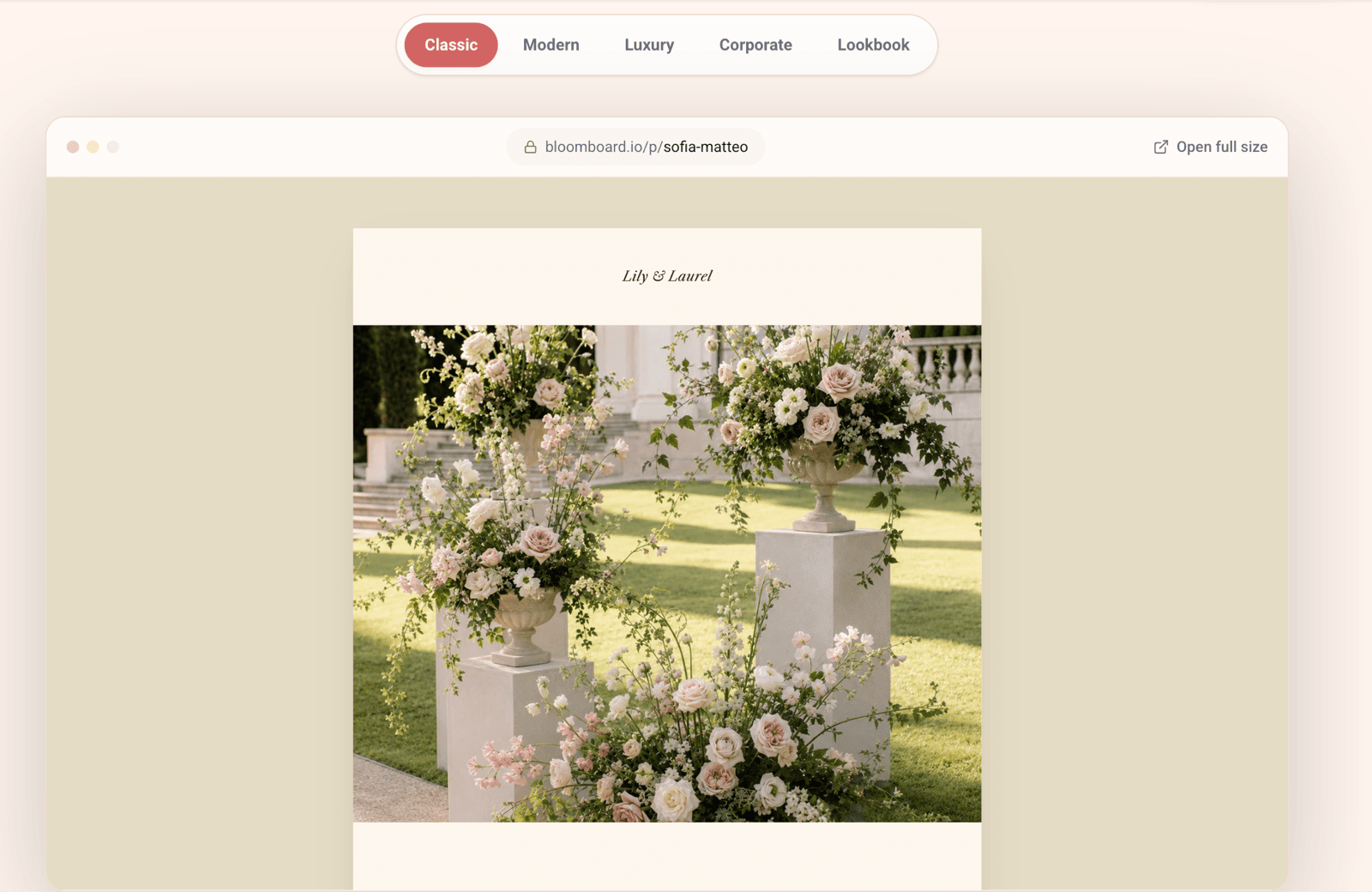
BloomBoard proposals — five template styles and a finished client proposal page - 04.
The booking, the deposit and the schedule
They sign on a Tuesday. Now there’s a deposit to take, a balance due before the day, and eighteen months of remembering which of your couples has paid what.
Signature, quote, deposit, payment schedule and invoices all sit on the same event. If you’re VAT registered, VAT is worked out automatically with sequential invoice numbering.
- 05.
Recipes, seasonality and the order sheet that follows
They booked an October wedding in April, and the moodboard is full of peonies. Peonies won’t be there in October. The recipe swaps to garden roses and spray roses — and then every stem count, every bucket and the wholesale order behind them has to change too.
Arrangements are built as recipes, and the stem counts roll up into your supplier order sheets and market shopping lists — change the recipe and the roll-up follows. Keep multiple supplier prices, with full history, against every flower, foliage and hard good, in any currency, so Dutch auction euros and local wholesale sit in the same recipe. Bulk import a supplier price list rather than typing it. See recipes and stem counts.
- 06.
Event week, with people who aren’t you
Conditioning on Wednesday, building Thursday and Friday, on site at seven on Saturday with a two-hour window before the registrar arrives. Two freelancers you booked in March are working from a photograph of a whiteboard, and every question comes back to you.
Timelines, run sheets, checklists and delivery plans for the whole week, in one place. Freelancers join through share links, so the person conditioning at your bench and the person in the van are reading the same run sheet, the same recipes and the same delivery plan. More on event-week production.
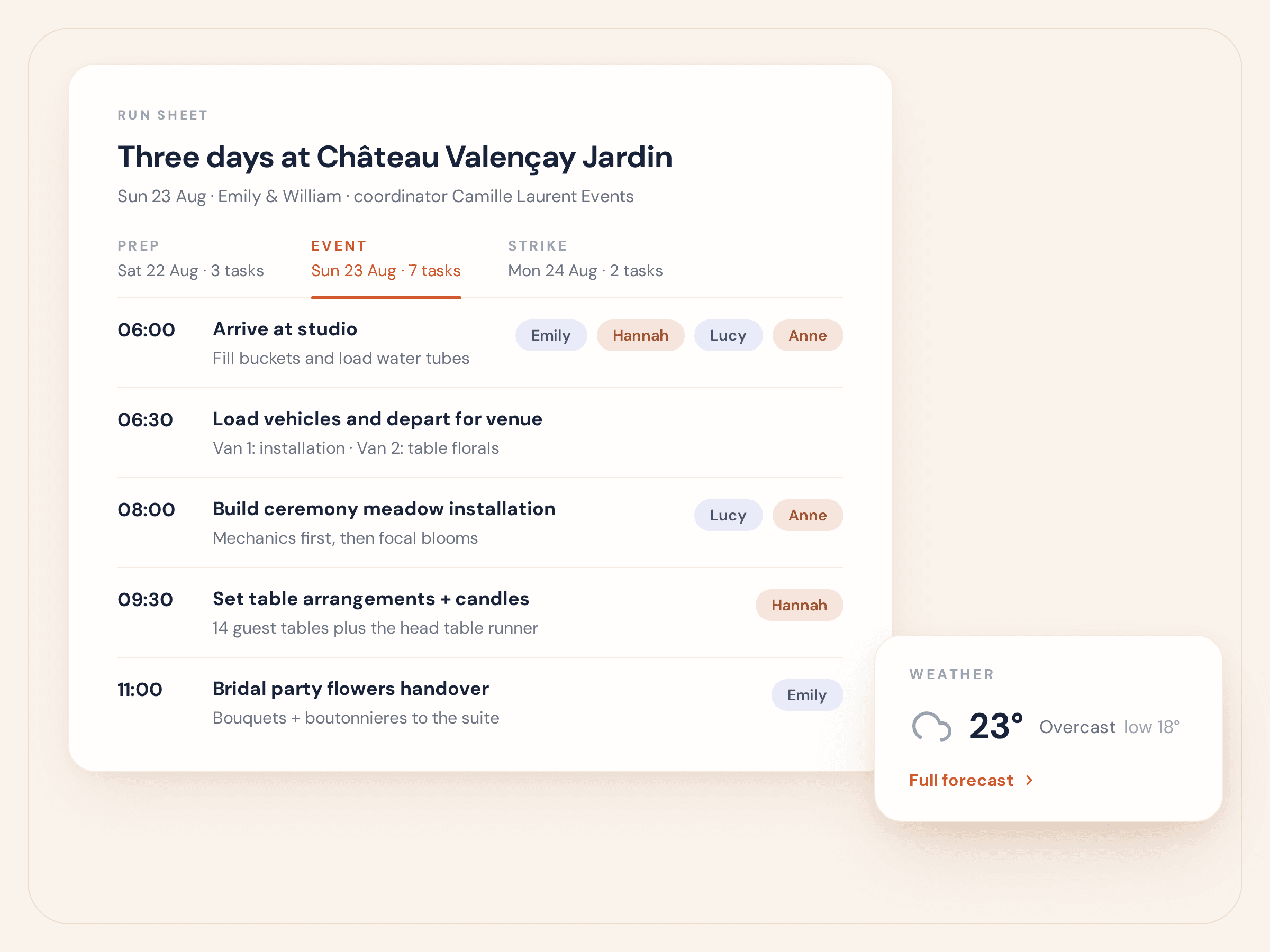
BloomBoard event week — the run sheet with timed tasks, team assignments and the venue weather forecast - 07.
Getting paid, and knowing what it made
The flowers were beautiful. Whether the wedding made money is a question you answer in February, from a spreadsheet, if at all.
Quotes, deposits, payment schedules and invoices live with the event that created them, with automatic VAT and sequential invoice numbering. Margins were visible while you were designing, not reconstructed afterwards. And the whole lot — library, events, proposals, invoices — exports whenever you want it.
Who this is for
Wedding florists — studios, solo florists and small teams — whose work is quoted months ahead, designed as recipes and delivered on one day. It fits the neighbouring work too: brand and corporate events, installations and private dinners all run on the same proposals, recipes and run sheets.
Who it’s not for
Retail flower shops. If most of your week is daily orders, walk-ins and a till that has to reconcile at close, you need a point-of-sale system, and BloomBoard isn’t one. We’d rather tell you now than three days into a trial — our guide to florist software compares the categories and points you at the right kind of tool.
Pricing
Two plans, both built for weddings.
Both include unlimited events, arrangements and proposals—and both start with a 14-day free trial. Prices in USD.
Core
Everything you need to run your floral business.
$99 / month
Billed monthly—cancel at any time.
- Unlimited events
- Client briefs, completed by your client
- A public enquiry link for your website and social media
- Proposal templates, digital links and eSignatures
- Recipes, order calculations and supplier order sheets
- Invoices, deposits and payment schedules
- Online client payments from the invoice page — card or bank transfer
- Event-week timelines, checklists and team links
- BloomBoard Assistant included
- Up to two team seats
Coming soon
- Mobile app
MOST POPULAR
Studio
Advanced tools for growing studios.
$149 / month
Billed monthly—cancel at any time.
Everything in Core, plus:
- Your branding on client pages and emails: logo, colours and your own domain
- Premium proposal templates
- Higher Smart Recipe Builder limits: 400 per month instead of 50
- Higher Smart Price Import limits: 20 per month instead of five
- More generous BloomBoard Assistant usage
- Up to five team seats
Coming soon
- Connected Gmail and Microsoft 365 accounts
- Mobile app
Every feature on. Run a real event through it.
Try BloomBoard free for 14 days with everything switched on—no credit card and no half-locked features. Plan a real event in BloomBoard and see whether it is right for your studio.
14 DAYS FREE · NO CREDIT CARD
Wedding florist questions
Asked and answered.
Is BloomBoard only for weddings?
No. BloomBoard is built for wedding and event florists, and the same proposals, recipes, orders and run sheets carry brand and corporate events, installations and private dinners. Weddings are simply the work it was shaped around.
Can my freelancers see the plan for event week?
Yes. Freelancers join through share links, so the person conditioning at your bench and the person in the van are reading the same run sheets, recipes and delivery plans. Paid seats are separate: Core includes 2 team seats and Studio includes 5.
What happens when the couple changes their mind?
Change the proposal and send the new version on the same client web link — every version is kept, so you can see what they agreed to and when. Change an arrangement’s recipe and the stem counts roll back up into your supplier order sheet and market shopping list, and your margins update while you work.
Do couples need a login to see and sign a proposal?
No. Every proposal gets a polished client web link with no login, couples sign electronically, and there is a PDF to download if they want to print it. Version history keeps the one they said yes to.
Can I bring my supplier price lists and the weddings I’m already planning?
Yes. Bulk import supplier price lists, and keep multiple supplier prices with full history against every flower, foliage and hard good, in any currency. Moving your existing clients, events, proposals and recipes across is included with every plan — see the switching page.
Can a retail flower shop use BloomBoard?
It isn’t the right tool. BloomBoard is not a point-of-sale system, so a shop running daily orders over the counter should use retail florist software with a POS. BloomBoard is for florists whose work is booked months ahead and delivered on one day.
Keep reading.
Florist software: the whole category
What the different kinds of florist software actually do, and which one fits your studio.
Proposals
Templates, client web links, electronic signatures, version history and PDFs.
Event florist software
Brand events, installations and private dinners — the same production plan as a wedding.
Recipes and stem counts
How arrangements become recipes, and how recipes become the wholesale order.
Switching to BloomBoard
Bring your clients, events, proposals and recipes with you. Included with every plan.

Start with the wedding that’s worrying you.
Put one real wedding into BloomBoard — the brief, the proposal, the recipes, the order — and see the whole thing in one place. 14 days, every feature on.
Start Free Trial14 days free · No credit card